
Key Takeaways
- An SSL certificate helps secure website connections. It enables HTTPS and supports encrypted communication between a visitor’s browser and a website server, reducing the risk of information being intercepted during transmission.
- HTTPS is important for business websites. It helps protect information submitted through contact forms, login pages and online transactions while supporting a more secure browsing experience.
- Different SSL certificate types serve different needs. Domain Validation (DV), Organization Validation (OV), Extended Validation (EV), Wildcard and Multi-Domain certificates offer different validation requirements or domain coverage.
- Free SSL certificates can be suitable for Malaysian SMEs. Free certificates can provide strong encryption, while paid options may include additional validation, technical support or certificate management services.
- SSL certificates require proper installation and renewal. Expired certificates, incorrect configurations and mixed-content problems can trigger browser warnings or prevent secure connections.
- HTTPS supports technical SEO but does not guarantee rankings. A correctly configured HTTPS website can meet an established Google security-related ranking consideration, although overall SEO performance depends on many other factors.
- Choosing hosting with SSL support simplifies website management. Malaysian business owners should consider SSL availability, renewal arrangements, technical assistance and other security features when selecting hosting services.
When customers visit your business website, they may submit contact details, complete enquiry forms or log in to an account.
Without a secure connection, information transmitted between their browser and your website could be exposed to interception.
An ssl certificate for website helps protect this communication by enabling HTTPS encryption.
It also allows browsers to verify that they are connecting to the domain identified in the certificate.
For Malaysian business owners, understanding SSL is an important part of maintaining a secure and professional online presence.
Whether you manage a WordPress website, corporate website or e-commerce store, knowing how SSL certificates work can help you avoid browser security warnings, choose suitable website hosting and manage your website more confidently.
Here are 11 essential facts every business owner should understand about SSL certificates, including their benefits, types, installation, renewal and limitations.
1. What Is an SSL Certificate for a Website?
An SSL certificate is a digital certificate that helps establish a secure, encrypted connection between a website and its visitors.
It enables HTTPS, allowing information transmitted between a browser and a website server to be protected against interception or unauthorised modification during transmission.
For Malaysian business owners, SSL certificates are relevant to websites that collect customer enquiries, process online transactions, manage user accounts or provide other interactive services.
An SSL certificate also helps browsers authenticate the website’s domain, although it does not independently guarantee that the business operating the website is legitimate or trustworthy.
What Does SSL Stand For?
SSL stands for Secure Sockets Layer, an older security protocol developed to protect information exchanged over the internet.
Although the original SSL protocols are obsolete, the term SSL certificate remains widely used when referring to certificates that support secure HTTPS connections.
What Is the Difference Between SSL and TLS?
TLS, or Transport Layer Security, is the modern successor to SSL. It provides encryption, authentication and data integrity protections for online communication.
Websites commonly use TLS even when their hosting providers advertise the service as SSL.
For business owners, the important consideration is whether their websites use properly configured, supported TLS versions with a valid certificate.
2. How Does an SSL Certificate Work?

An SSL certificate supports secure communication through a process called the TLS handshake.
When a visitor opens an HTTPS website, the browser and server establish a secure connection before exchanging protected website information.
The process generally involves:
- The browser connects to the website’s server and begins negotiating a secure connection.
- The server presents its digital certificate.
- The browser checks whether the certificate is valid, trusted and appropriate for the requested domain.
- The browser and server establish cryptographic session keys.
- The connection uses those keys to encrypt information transmitted between them.
This process normally occurs automatically without requiring visitors to perform additional steps.
How SSL/TLS Encryption Protects Website Connections
Encryption transforms readable information into protected data that cannot easily be understood by someone intercepting the transmission.
For example, when a potential customer completes a quotation request form, HTTPS helps protect the submitted information as it travels between their browser and the website server.
Modern TLS connections use cryptographic mechanisms involving public and private keys during connection establishment and efficient symmetric encryption for data transfer.
However, TLS does not protect information after it has been received and stored on an inadequately secured server.
What Role Do Certificate Authorities Play?
A Certificate Authority (CA) is an organisation that issues digital certificates after completing the applicable validation requirements.
Certificate authorities help browsers establish whether a certificate can be trusted.
They may validate domain control, organisation information or additional business details, depending on the certificate type.
A properly issued certificate establishes trust in the secure connection and the validated identity information, not in every aspect of the website owner’s conduct.
3. What Is the Difference Between HTTP and HTTPS?
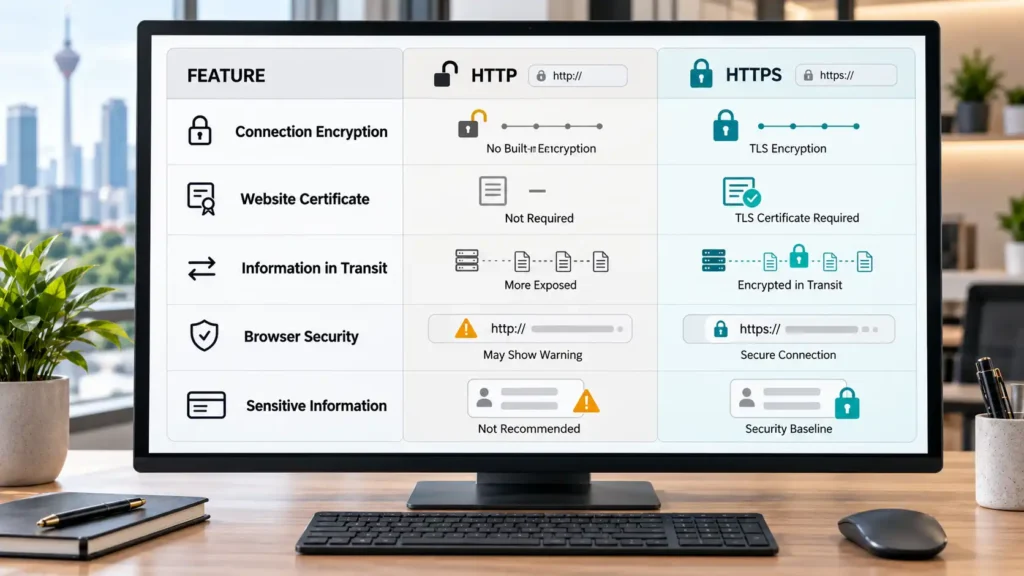
HTTP stands for Hypertext Transfer Protocol, while HTTPS refers to HTTP communication protected by TLS encryption.
The main distinction concerns how information is transmitted between website visitors and servers.
Feature | HTTP | HTTPS |
Connection encryption | Not provided by HTTP itself | Uses TLS encryption |
Website certificate | Not required for ordinary HTTP | Requires appropriate TLS certificate |
Information in transit | More exposed to interception or alteration | Protected against many interception and alteration risks |
Browser security indicators | May display a security warning | Can establish a trusted secure connection |
Suitable for collecting sensitive information | Not recommended | Expected security baseline |
How HTTPS Helps Secure Information in Transit
HTTPS helps protect information exchanged through contact forms, account login pages, online booking systems and payment-related website functions.
For example, a Malaysian service provider collecting customer names, phone numbers and enquiry details should use HTTPS to help protect those submissions while they are being transmitted.
However, HTTPS is only one component of website security. Businesses should also implement appropriate access controls, software updates and data protection practices.
How to Recognise a Secure HTTPS Connection
Visitors can check whether a website uses HTTPS by examining the address beginning with https://.
Modern browsers may also provide a site information or connection security control near the address bar.
Business owners should remember that browser interface designs differ and that the appearance of HTTPS does not prove that a website or its operator is trustworthy.
4. Why Do Business Websites Need SSL Certificates?
A business website often serves as a customer’s first point of contact. It may display service information, receive enquiries, provide appointment forms or support online transactions.
An SSL certificate helps establish a secure connection for these activities.
For businesses developing their online presence, website security should be considered alongside navigation, functionality and professional presentation. Readers planning a new website can explore this guide to design website malaysia for related website development considerations.
Protecting Information Submitted Through Website Forms
Contact forms commonly collect names, email addresses, phone numbers and service requirements.
HTTPS helps protect this information while it travels from a customer’s device to the website server.
However, businesses must also protect stored information through secure hosting, restricted access and appropriate website maintenance.
Supporting Customer Confidence and Secure Browsing
Browser security warnings can discourage customers from continuing to browse or submit information.
A properly configured HTTPS connection helps avoid warnings related to an insecure connection and demonstrates that the website uses a recognised security measure.
This is particularly relevant for corporate websites, professional service providers, appointment-based businesses and online stores.
Nevertheless, an SSL certificate does not independently verify service quality, business reliability or customer satisfaction.
5. What Are the Different Types of SSL Certificates?
SSL certificates are commonly classified by their validation requirements and the number of domains they cover.
Understanding these differences helps business owners avoid purchasing certificates that are unnecessarily complicated or unsuitable for their websites.
Domain Validation (DV), Organization Validation (OV) and Extended Validation (EV)
Domain Validation (DV) certificates verify control over the relevant domain. They are commonly used for blogs, small business websites and other websites requiring HTTPS encryption.
Organization Validation (OV) certificates involve additional checks of the organisation’s identity. They may be useful when a business needs validated organisational information associated with its certificate.
Extended Validation (EV) certificates require a more extensive organisational validation process. They may be considered by organisations with specific identity-assurance or certificate policy requirements.
Importantly, DV, OV and EV classifications describe validation differences. They do not inherently determine the strength of the encryption used by a properly configured TLS connection.
Modern browsers also do not generally provide the prominent company-name indicators once associated with EV certificates.
Wildcard and Multi-Domain SSL Certificates
A Wildcard SSL certificate can cover a domain and multiple subdomains at a particular level, depending on its configuration.
For example, it may help secure shop.example.com and blog.example.com under one appropriate certificate.
A Multi-Domain certificate can cover multiple specified domain names, which may be useful when a company operates several websites.
Business owners should review domain coverage, certificate management requirements and hosting compatibility before making a selection.
6. Should Businesses Choose Free or Paid SSL Certificates?
A free SSL certificate can be suitable for many Malaysian business websites, including blogs, corporate websites and small online stores.
The right choice depends on validation requirements, hosting compatibility, support arrangements and certificate management needs.
Comparing Free and Paid SSL Certificates
Consideration | Free SSL | Paid SSL |
TLS encryption | Supports strong encryption when properly configured | Supports strong encryption when properly configured |
Domain validation | Commonly DV | DV, OV or EV options may be available |
Cost | No certificate issuance fee | Pricing depends on certificate and provider |
Renewal | Frequently supports automation | Depends on provider and service arrangements |
Technical support | Varies by provider or host | May include additional assistance |
Organisation validation | Generally not included with typical free DV certificates | Available with qualifying OV or EV certificates |
Free certificates are not automatically less secure simply because they do not carry a purchase price.
When Is a Free SSL Certificate Suitable?
A free DV certificate may be appropriate when a business needs a standard encrypted HTTPS connection and does not require organisation-level certificate validation.
Let’s Encrypt, for example, is a nonprofit certificate authority that provides free TLS certificates.
Business owners should still consider certificate renewal, installation assistance and the reliability of their hosting environment.
Paid certificates may be worth evaluating where organisational validation, particular support arrangements or specialised certificate management requirements are necessary.
7. How Do You Install an SSL Certificate on a Website?
SSL installation depends on the website’s hosting environment, control panel and certificate provider.
Many hosting services simplify installation through automatic certificate provisioning or integrated management tools.
Installing SSL Through a Website Hosting Provider
Start by checking whether your hosting package already includes SSL support.
If SSL is available, the general setup process may involve:
- Accessing your hosting control panel.
- Finding the SSL/TLS management section.
- Confirming that your domain points to the correct hosting server.
- Activating or requesting a certificate for the domain.
- Allowing domain validation and certificate installation to complete.
- Testing the HTTPS connection.
Some providers perform these tasks automatically, while others require manual configuration.
If you are establishing a new business website, understanding cara daftar domain can also help you prepare the domain registration stage before configuring website hosting and SSL.
Enabling HTTPS on WordPress and Business Websites
WordPress website owners should confirm that a valid certificate is installed before changing their website configuration to HTTPS.
Once HTTPS is working, check the WordPress Address and Site Address settings, website links, theme resources and plugins.
A backup is advisable before making major configuration changes, particularly when updating an existing website.
Redirecting HTTP Pages to HTTPS
After HTTPS has been configured successfully, HTTP URLs should normally redirect to their corresponding HTTPS versions.
Permanent redirects help visitors and search engines access the intended secure URLs.
Website owners should also check internal links, canonical tags, XML sitemaps and other relevant website configurations to avoid conflicting URL signals.
8. How Can You Check and Renew an SSL Certificate?
SSL certificates have limited validity periods and must be renewed or replaced before they expire.
Business owners should not assume that a certificate will remain valid indefinitely simply because HTTPS was configured when the website launched.
Checking SSL Certificate Validity and Expiry
To check a certificate, open the HTTPS website and inspect its connection or certificate information using the browser’s available controls.
Review the following details:
- Whether the certificate is currently valid.
- Which domain names the certificate covers.
- The certificate’s issuing authority.
- Its validity and expiry information.
- Whether the website presents any certificate-related warnings.
An external SSL testing service can also help identify certificate-chain and configuration problems.
Renewing Certificates and Avoiding Expiry Warnings
Certificate renewal depends on the certificate provider and hosting arrangement.
Some hosting environments automatically request and install replacement certificates. Others require administrator intervention.
Businesses should confirm whether renewal is automatic, monitor certificate validity and ensure that the person responsible for website maintenance can respond to failures.
This is particularly important for websites that receive enquiries or provide customer-facing services every day.
9. What Are Common SSL Certificate Errors?
SSL-related errors can prevent visitors from establishing trusted connections or cause browsers to display security warnings.
Understanding the likely causes helps business owners communicate problems accurately to their hosting providers or website developers.
Expired Certificates and Domain Mismatch Warnings
An expired certificate is no longer within its permitted validity period.
A domain mismatch occurs when the certificate does not cover the hostname that a visitor is attempting to access.
For example, a certificate issued only for one hostname may not automatically cover every subdomain.
Other problems can include an incomplete certificate chain, an untrusted issuing authority or an incorrectly installed certificate.
Mixed-Content Errors and Troubleshooting
Mixed content occurs when an HTTPS page attempts to load certain resources through HTTP.
These resources may include images, scripts, stylesheets or embedded content.
Depending on the resource and browser, insecure content may be blocked, upgraded or generate warnings.
Website owners can troubleshoot common problems by checking certificate validity, confirming domain coverage, reviewing server configuration and identifying insecure resource URLs.
For WordPress websites, mixed-content problems may also involve outdated database URLs, theme files or plugin settings.
Where the cause is unclear, seek assistance from the hosting provider or website developer rather than ignoring security warnings.
10. Does an SSL Certificate Help With SEO?
HTTPS is relevant to technical SEO because it supports secure website access and is an established consideration within Google’s ranking systems.
However, installing an SSL certificate does not automatically improve search visibility or guarantee higher rankings.
HTTPS and Google’s Ranking Systems
Google has recognised HTTPS as a ranking signal, although it is only one consideration among many factors used to evaluate search results.
For businesses, the more immediate benefits of HTTPS include protecting visitor connections and avoiding browser warnings associated with unsecured or incorrectly configured websites.
When migrating from HTTP to HTTPS, website owners should also review redirects, canonical URLs, internal links and XML sitemaps.
Correct implementation helps search engines identify the preferred secure versions of website pages.
Why SSL Alone Cannot Guarantee Better Rankings
Search visibility depends on many factors beyond HTTPS, including content quality, relevance, technical accessibility and the usefulness of information provided to visitors.
A website with a valid SSL certificate can still have weak content, broken pages or technical SEO problems.
Therefore, SSL should be treated as an essential technical security measure rather than a standalone SEO strategy.
Business owners should combine HTTPS with useful content, sound website architecture and ongoing maintenance.
11. How Do You Choose Website Hosting With SSL Support in Malaysia?

Choosing a hosting provider involves more than comparing storage capacity or monthly pricing.
For Malaysian SMEs, SSL support should form part of a broader evaluation of website reliability, security, maintenance and technical assistance.
SSL Features to Check Before Choosing Hosting
Before selecting a hosting package, ask whether it includes:
- A trusted SSL certificate for the intended domain.
- Certificate installation or automatic provisioning.
- Automatic renewal or clear renewal procedures.
- Support for HTTPS redirects.
- Suitable coverage for relevant subdomains.
- Technical assistance with certificate errors.
- Other security measures such as backups, software protection and access controls.
The availability of these features may differ between hosting packages.
Why Renewal Support and Website Maintenance Matter
SSL certificate management continues after installation.
Businesses should know who is responsible for certificate renewal, website updates and resolving security warnings.
For example, a company that depends on customer enquiry forms should ensure that certificate problems can be identified and addressed promptly.
The Rich Web advertises free SSL (HTTPS) in its shared hosting packages. This may be relevant to Malaysian businesses comparing hosting options, although customers should confirm the current package terms, certificate coverage and available support directly with the provider.
Reliable SSL management, combined with appropriate website security practices, helps establish a more secure foundation for a business website.
Conclusion: Why SSL Certificates Matter for Business Websites
Understanding the importance of an ssl certificate for website helps Malaysian business owners make better decisions about online security.
From protecting information transmitted through customer enquiry forms to enabling HTTPS connections, SSL certificates play an essential role in maintaining a secure business website.
The 11 essential facts covered in this guide show that choosing the right certificate involves more than simply activating HTTPS.
Business owners should understand certificate types, compare free and paid options, check installation settings, monitor expiry dates and address security warnings promptly.
However, SSL encryption is only one part of website protection.
Regular software updates, secure hosting, reliable backups and appropriate access controls remain important for maintaining a safer online environment.
If you are planning a new business website or reviewing your existing hosting package, explore The Rich Web’s Hosting Website Malaysia services to learn about its hosting options and advertised free SSL (HTTPS) inclusion.
Check the current package features and renewal arrangements to determine whether they suit your website’s requirements.
For more practical information about managing and growing a business online, explore the Business category on Local Vitals.
Related article
Frequently Asked Questions About SSL Certificates
Can a Website Work Without an SSL Certificate?
Yes. A website can technically operate using HTTP without an SSL certificate. However, HTTP does not provide the same transport encryption as HTTPS, and browsers may warn users about insecure connections. Business websites should use HTTPS, especially when collecting customer information.
Is a Free SSL Certificate Safe for Business Websites?
Yes. A properly issued and configured free SSL certificate can provide strong TLS encryption. Free Domain Validation certificates are suitable for many business websites, including WordPress websites and online stores. Businesses should also consider certificate renewal, hosting security and technical support.
Does an SSL Certificate Protect Against Hackers?
An SSL certificate helps protect information transmitted between a visitor’s browser and a website server. However, it does not prevent every cyberattack. Malware, outdated software, weak passwords and vulnerable plugins can still compromise a website. Additional security measures are necessary.
Can One SSL Certificate Cover Multiple Domains?
Yes. A Multi-Domain SSL certificate can cover several specified domain names. Wildcard certificates can protect multiple subdomains within their supported scope. The appropriate option depends on the number and structure of the websites being managed.